# Choix de l'espace Structure

\- <span style="mso-spacerun: yes;"> </span><span style="mso-spacerun: yes;"> </span>Si vous n’avez qu’un seul établissement, celui-ci sera implicite

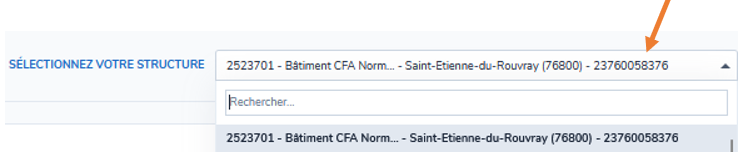
<span style="mso-ascii-font-family: Calibri; mso-fareast-font-family: Calibri; mso-hansi-font-family: Calibri; mso-bidi-font-family: Calibri;"><span style="mso-list: Ignore;">-<span style="font: 7.0pt 'Times New Roman';"> </span></span></span>Si vous avez des droits d’accès sur **<u>plusieurs établissements</u>**, sélectionnez d’abord l’espace de la structure sur laquelle vous souhaitez intervenir. Le choix de cet espace détermine ensuite l’affichage de tous les autres éléments (fiche structure, formations, contacts …).

<p class="callout warning"><span style="mso-ascii-font-family: Calibri; mso-fareast-font-family: Calibri; mso-hansi-font-family: Calibri; mso-bidi-font-family: Calibri;"><span style="mso-list: Ignore;"><span style="font: 7.0pt 'Times New Roman';"> </span></span></span>**<span style="color: red;">Pour toute création de formation, sélectionnez l’organisme de formation porteur du numéro de déclaration d’activité</span>**</p>

[![image.png](https://wiki.cariforefnormandie.fr/uploads/images/gallery/2025-05/scaled-1680-/H0zCpt8ZCRSsj5nE-image.png)](https://wiki.cariforefnormandie.fr/uploads/images/gallery/2025-05/H0zCpt8ZCRSsj5nE-image.png)