# Formation certifiante

<span style="color: black; mso-themecolor: text1;">Si votre formation est certifiante, </span>déplacez le curseur sur **<span style="color: #0070c0;">Oui</span>**

[![image.png](https://wiki.cariforefnormandie.fr/uploads/images/gallery/2025-04/scaled-1680-/oALMRtU65GzMn3oV-image.png)](https://wiki.cariforefnormandie.fr/uploads/images/gallery/2025-04/oALMRtU65GzMn3oV-image.png)

Puis cliquez sur la loupe pour accéder au moteur de recherche des certifications (RNCP et Répertoire spécifique)

Par défaut, le système télécharge toutes les certifications dont l’état est publié ! (Quelques secondes de charge)

Pour affiner votre recherche, utilisez le mode **<span style="color: #0070c0;">Rechercher </span>**<span style="font-size: 11.0pt; line-height: 107%; font-family: 'Calibri',sans-serif; mso-ascii-theme-font: minor-latin; mso-fareast-font-family: Calibri; mso-fareast-theme-font: minor-latin; mso-hansi-theme-font: minor-latin; mso-bidi-font-family: 'Times New Roman'; mso-bidi-theme-font: minor-bidi; mso-ansi-language: FR; mso-fareast-language: EN-US; mso-bidi-language: AR-SA;">Vous pouvez indiquer le **<span style="color: #0070c0;">libellé du diplôme, le code RNCP, le code RS</span>**</span>

[![image.png](https://wiki.cariforefnormandie.fr/uploads/images/gallery/2025-04/scaled-1680-/DWjdZdUvk5hqXadN-image.png)](https://wiki.cariforefnormandie.fr/uploads/images/gallery/2025-04/DWjdZdUvk5hqXadN-image.png)

[![image.png](https://wiki.cariforefnormandie.fr/uploads/images/gallery/2025-04/scaled-1680-/Iud5qG05pk9OMQbH-image.png)](https://wiki.cariforefnormandie.fr/uploads/images/gallery/2025-04/Iud5qG05pk9OMQbH-image.png)

<p class="callout info">***Si vous sélectionnez plusieurs certifications (ou habilitations). cela indique que le stagiaire sera amené à valider ces différents titres au cours de sa session de formation (tout ou partie des blocs de compétences). Ces éléments seront à préciser dans la session, rubrique « Blocs de compétences ».***</p>

**Assurez-vous également d'être habilité à former sur le titre sélectionné ! Votre SIRET (OF responsable ou OF formateur) doit être inscrit dans la liste des partenaires habilités à former sur France compétences.**

Un contrôle s’effectue via la base Quiforme ([https://www.intercariforef.org/rco\_search/quiforme)](https://www.intercariforef.org/rco_search/quiforme)) sur vos habilitations à former à l'enregistrement de la formation.

[![image.png](https://wiki.cariforefnormandie.fr/uploads/images/gallery/2025-12/scaled-1680-/iPipb9mXxW3G5tgr-image.png)](https://wiki.cariforefnormandie.fr/uploads/images/gallery/2025-12/iPipb9mXxW3G5tgr-image.png)

Pour les Titre pro et autres titres inscrits sur demande, si ce message apparaît, vous devez contacter le certificateur de ce diplôme afin qu’il inscrive votre SIRET dans la liste des OF habilités à former. Vos formations ne pourront être diffusées tant que cet affichage perdurera.

**<u>Exception</u>** : les certifications du **Ministère de l’éducation nationale, de l’enseignement supérieur et de la recherche** ne sont pas concernées car le valideur n’affiche pas de liste pour le moment (Ex. : CAP, BTS, licence …).

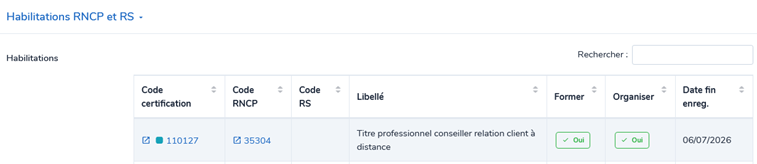
Pour rappel, la liste de vos habilitations sont visibles dans **vos fiches structures**, onglet Habilitations RNCP et RS.
<span style="mso-no-proof: yes;">![Une image contenant texte, Police, ligne, nombre

Le contenu généré par l’IA peut être incorrect.](https://wiki.cariforefnormandie.fr/uploads/images/gallery/2025-12/hZizmQtpNSpeP2kr-embedded-image-a6xrq4uk.png)</span>

- <span style="mso-ascii-font-family: Calibri; mso-fareast-font-family: Calibri; mso-hansi-font-family: Calibri; mso-bidi-font-family: Calibri;"><span style="mso-list: Ignore;"><span style="font: 7.0pt 'Times New Roman';"> </span></span></span>ORGANISME RESPONSABLE :  
      
    <p class="callout danger"><span style="color: red;"> Pour rappel, l'organisme responsable est automatiquement renseigné par celui que vous avez sélectionné dans votre espace structure. Il doit être **<u>porteur du numéro de déclaration d’activité</u>** qui seul, est considéré comme organisme responsable !   
    Si vous ne voyez pas ce numéro de déclaration d’activité ici, cliquez sur </span>**<span style="color: #0070c0;">Supprimer ma demande</span>**<span style="color: #0070c0;"> </span><span style="color: red;">pour retourner sur le tableau de bord et modifier votre </span>**<span style="color: #0070c0;">Espace structure</span>**<span style="color: red;">.</span><span style="mso-no-proof: yes;"> </span></p>
    
    <span style="color: red;"> </span>

Votre choix effectué, les informations générales de votre formation sont préremplies à partir du référentiel :

- <span style="mso-ascii-font-family: Calibri; mso-fareast-font-family: Calibri; mso-hansi-font-family: Calibri; mso-bidi-font-family: Calibri;"><span style="mso-list: Ignore;">-<span style="font: 7.0pt 'Times New Roman';"> </span></span></span>La certification sélectionnée
- <span style="mso-ascii-font-family: Calibri; mso-fareast-font-family: Calibri; mso-hansi-font-family: Calibri; mso-bidi-font-family: Calibri;"><span style="mso-list: Ignore;">-<span style="font: 7.0pt 'Times New Roman';"> </span></span></span>L’intitulé de la formation (reprise de l’intitulé de la certification)
- <span style="mso-ascii-font-family: Calibri; mso-fareast-font-family: Calibri; mso-hansi-font-family: Calibri; mso-bidi-font-family: Calibri;"><span style="mso-list: Ignore;">-<span style="font: 7.0pt 'Times New Roman';"> </span></span></span>Le niveau d’entrée **(automatiquement à « sans niveau spécifique ». A modifier par vos soins si besoin).**
- <span style="mso-ascii-font-family: Calibri; mso-fareast-font-family: Calibri; mso-hansi-font-family: Calibri; mso-bidi-font-family: Calibri;"><span style="mso-list: Ignore;">-<span style="font: 7.0pt 'Times New Roman';"> </span></span></span>Le niveau de sortie
- <span style="mso-ascii-font-family: Calibri; mso-fareast-font-family: Calibri; mso-hansi-font-family: Calibri; mso-bidi-font-family: Calibri;"><span style="mso-list: Ignore;">-<span style="font: 7.0pt 'Times New Roman';"> </span></span></span>L’objectif de la formation
- <span style="mso-ascii-font-family: Calibri; mso-fareast-font-family: Calibri; mso-hansi-font-family: Calibri; mso-bidi-font-family: Calibri;"><span style="mso-list: Ignore;">-<span style="font: 7.0pt 'Times New Roman';"> </span></span></span>Le contenu (si renseigné dans Certifinfo)

<p class="callout danger"><span style="color: black; mso-themecolor: text1;">La date de fin d’enregistrement et l’état de la certification vous permet de vérifier la validité de la certification sélectionnée.   
Dans tous les cas, votre date de <u>début de session</u> doit **<u>obligatoirement</u>** être inférieure à la date de fin d’enregistrement de la certification.</span></p>